
Last updated on
Oct 31, 2026

TX Residential Lease Agreement free printable template
pdfFiller is not affiliated with any government organization

Fill out
Complete the form online in a simple drag-and-drop editor.

eSign
Add your legally binding signature or send the form for signing.

Share
Share the form via a link, letting anyone fill it out from any device.

Export
Download, print, email, or move the form to your cloud storage.
Why pdfFiller is the best tool for your documents and forms


End-to-end document management
From editing and signing to collaboration and tracking, pdfFiller has everything you need to get your documents done quickly and efficiently.
Accessible from anywhere
pdfFiller is fully cloud-based. This means you can edit, sign, and share documents from anywhere using your computer, smartphone, or tablet.
Secure and compliant
pdfFiller lets you securely manage documents following global laws like ESIGN, CCPA, and GDPR. It's also HIPAA and SOC 2 compliant.
What is TX Residential Lease Agreement
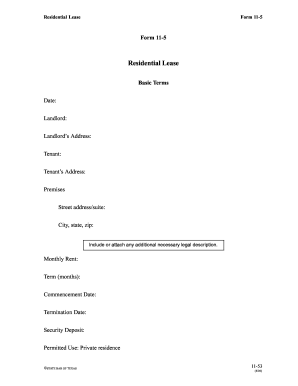
The Texas Residential Lease Agreement is a legal document used by landlords and tenants to establish terms for renting property in Texas.
pdfFiller scores top ratings on review platforms




So far I am very satisfied with PDF FILLER
Use this all the time, I am pro se in 2 civil suits . PDF Filler has helped all the way
Who needs TX Residential Lease Agreement?
Explore how professionals across industries use pdfFiller.

TX Residential Lease Agreement is needed by:
-
Landlords seeking to rent property in Texas
-
Tenants looking for rental agreements in Texas
-
Real estate agents involved in rental transactions
-
Property managers handling lease agreements
-
Investors renting out residential properties
-
Legal professionals advising clients on rental agreements
Comprehensive Guide to TX Residential Lease Agreement
What is the Texas Residential Lease Agreement?
The Texas Residential Lease Agreement is a legally binding document established to detail rental agreements between landlords and tenants in Texas. Its primary purpose is to clarify the terms of the rental arrangement, including the property details, rent amount, security deposit, and lease term. This agreement is significant for both parties as it provides legal recourse should disputes arise, ensuring that each party understands their rights and obligations within the rental relationship.
Landlords rely on this agreement to enforce property rules and regulations, while tenants benefit from having a clear understanding of their housing terms. The document's importance cannot be understated, as it acts as a fundamental reference point in the landlord-tenant relationship.
Purpose and Benefits of the Texas Residential Lease Agreement
Having a formal lease agreement in place offers numerous advantages for both landlords and tenants. Firstly, it serves to protect the rights of both parties by outlining specific terms regarding rent, maintenance responsibilities, and usage of the property. This clarity can prevent misunderstandings and conflicts during the lease period.
Additionally, the Texas lease agreement template provides a standardized format for documenting the essentials of the rental arrangement, making it easier for landlords and tenants to review and understand their commitments. Implementing this agreement fosters a sense of security and professionalism in rental dealings.
Key Features of the Texas Residential Lease Agreement
Essential components of the Texas Residential Lease Agreement include:
-
Rent amount and payment schedule
-
Lease term (duration of the rental agreement)
-
Security deposit requirements
-
Terms of use for the property
-
Maintenance responsibilities for both parties
Additionally, it is crucial to understand unique Texas-specific regulations that may impact lease agreements, such as guidelines on security deposits and tenant rights. The clarity provided by the agreement helps ensure compliance with state laws.
Who Needs the Texas Residential Lease Agreement?
The primary users of the Texas Residential Lease Agreement are landlords and tenants engaged in rental transactions within the state. This document becomes necessary in various scenarios, including:
-
When renting residential properties
-
When a written record of rental terms is required
-
For documenting property rules and expectations
Both parties benefit from the structure and clarity that the lease agreement provides, which is essential for positive landlord-tenant relationships.
How to Fill Out the Texas Residential Lease Agreement Online (Step-by-Step)
Completing the Texas Residential Lease Agreement using pdfFiller involves a few straightforward steps:
-
Access the fillable form template on pdfFiller.
-
Enter the landlord’s and tenant’s names in the designated fields.
-
Specify the rent amount and security deposit amounts accurately.
-
Fill in important dates, including the lease start and end date.
-
Review all entered information for accuracy before saving.
This structured process ensures that all necessary details are captured properly, contributing to a legally sound agreement.
Common Errors and How to Avoid Them
When completing the Texas Residential Lease Agreement, common mistakes can lead to confusion or disputes. Frequent errors include:
-
Missing essential fields like names or dates
-
Incorrect rent or security deposit amounts
To avoid these issues, utilize a review checklist that ensures all required fields are complete and accurate before submitting the document. Double-checking entries prevents potential legal complications in the future.
How to Sign the Texas Residential Lease Agreement
Signing options for the Texas Residential Lease Agreement include both digital and wet signatures. Each method has its legal implications:
-
Digital signatures can be completed through platforms like pdfFiller, providing convenience.
-
Wet signatures remain valid but may require physical presence for both parties.
Understanding these options allows landlords and tenants to choose the method that suits their needs while maintaining the integrity of the lease.
Security and Compliance for the Texas Residential Lease Agreement
When handling lease agreements, data protection is paramount. Utilizing reputable platforms like pdfFiller enhances security through various measures such as:
-
256-bit encryption during data transmission
-
Compliance with regulations such as HIPAA and GDPR
These measures ensure that sensitive information remains confidential and protected against unauthorized access.
How to Download, Save, and Print the Texas Residential Lease Agreement
After completing the Texas Residential Lease Agreement, users can download it as a PDF by following these simple steps:
-
Select the download option in pdfFiller.
-
Choose the PDF format for the completed agreement.
-
Save the document to your desired location.
-
Use the print option to produce a hard copy of the final document.
This process ensures that you have both digital and physical copies of the lease agreement for your records.
Enhance Your Experience with pdfFiller
PdfFiller offers features that streamline document editing, filing, and eSigning, making the management of the Texas Residential Lease Agreement more efficient. By utilizing the platform, users gain enhanced security, easy access to fillable form templates, and user-friendly editing tools.
This combination of efficiency and security positions pdfFiller as a valuable resource for anyone looking to navigate rental agreements smoothly.
How to fill out the TX Residential Lease Agreement
-
1.Begin by accessing pdfFiller's website and search for the 'Texas Residential Lease Agreement' form in the template gallery.
-
2.Once located, open the form by clicking on it, which will load the fillable template in the pdfFiller interface.
-
3.To complete the form efficiently, gather necessary information, including the property address, names and contact details of the landlord and tenant, rental amounts, and security deposit figures beforehand.
-
4.Navigate through the form using the mouse or keyboard, filling out the required fields such as tenant and landlord names, rental amount, and security deposit. Make sure to checkboxes for any specific terms you wish to include.
-
5.As you fill in the information, double-check for accuracy to avoid common mistakes such as misspelled names or incorrect amounts.
-
6.Once you’ve completed the form, use the 'Review' option to ensure everything is filled out correctly, paying close attention to required fields and any highlighted areas needing information.
-
7.To finalize the document, click the 'Save' button. You can then choose to download the completed form to your computer or submit it directly to a third party through pdfFiller.
-
8.If needed, take advantage of the optional features available, like adding e-signatures or sharing the form via email for further verification.

Who is eligible to use the Texas Residential Lease Agreement?
Any landlord and tenant entering a rental agreement for a residential property in Texas can use this form. It is essential for both parties to understand the terms outlined in the document.
What should I include in the Texas Residential Lease Agreement?
Essential details include the property address, rental amount, security deposit, lease duration, and responsibilities of both landlord and tenant. Don’t forget to review the terms of use and maintenance responsibilities.
Can this form be submitted electronically?
Yes, once completed on pdfFiller, the Texas Residential Lease Agreement can be submitted electronically. You can download it for local storage or email it directly to the involved parties.
What are common mistakes to avoid while filling out this form?
Common mistakes include failing to complete all required fields, omitting signatures, or incorrectly entering rental amounts. Ensure all information is accurate and review the form before submission.
Is notarization required for this agreement?
No, the Texas Residential Lease Agreement does not require notarization. However, both parties should sign the document for it to be valid.
What is the timeline for completing the Texas Residential Lease Agreement?
The timeline varies per individual circumstances, but it is advisable to complete the agreement before the tenant moves in to ensure clarity and avoid potential disputes.
Where can I find additional resources or help for filling this form out?
For additional assistance, consult legal professionals or seek help via pdfFiller’s customer service. Templates and instructional videos can also guide you through the process.
Related Forms




Related Catalogs
Get the latest insights from our blog


If you believe that this page should be taken down, please follow our DMCA take down process
here
.
This form may include fields for payment information. Data entered in these fields is not covered by PCI DSS compliance.